What is FLOGI, PLOGI, and PRLI in a SAN switch? Understanding these critical device login processes is essential for anyone working with Storage Area Networks (SANs). This blog provides a detailed explanation of these three fundamental steps that enable devices to communicate within a SAN fabric: FLOGI (Fabric Login), PLOGI (Port Login), and PRLI (Process Login). Mastering these concepts is key to troubleshooting connectivity issues and optimizing SAN performance.

Understanding Device Login in SAN Switches
Device login in a SAN switch is a crucial series of processes that occur when a new node, such as a server or storage array, connects to a SAN fabric. This process ensures that the device is properly identified and authorized to communicate with other devices within the fabric. Successfully completing the device login process – encompassing FLOGI, PLOGI, and PRLI – is essential for establishing communication and data transfer within the SAN environment.
Key Components Involved in Device Login
Several key components are involved in the device login process within a SAN switch environment. These components include:
- Hosts: These are typically servers that require access to storage resources provided by the storage arrays. The host initiates the login process to gain access to the SAN fabric.
- Arrays: These are the storage arrays that provide the storage resources to the hosts. They respond to the login requests from the hosts and participate in the authentication and authorization process.
- SAN Switch: The SAN switch acts as the central connection point for all devices within the SAN fabric. It manages the login process, assigns FCIDs, and facilitates communication between hosts and storage arrays. It includes Fibre Channel (FC) ports for connectivity.
A device login process is mandatory for all new devices connecting to a SAN fabric for the first time. This process ensures proper identification, authorization, and communication setup within the SAN environment.
FLOGI: Fabric Login Explained
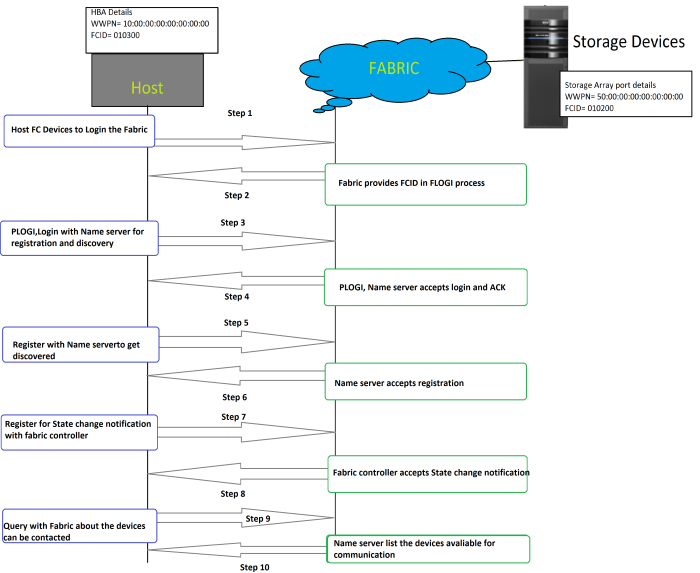
The FLOGI (Fabric Login) process is the initial step when a device connects to a SAN fabric. During FLOGI, the device transmits its first frame to the SAN switch. The switch then assigns a unique Fibre Channel ID (FCID) to the device. The device acknowledges the FCID assignment to the switch.
The SAN switch uses the FCID to identify the newly connected device within the SAN network. This process happens when a new device connects to the SAN switch or fabric for the first time. The initial frame sent by the device contains vital information, including the World Wide Port Name (WWPN) and buffer-to-buffer credits (B2B credits), which are essential for flow control.
PLOGI: Port Login Deep Dive
The PLOGI (Port Login) process involves two key steps: port initialization and name server registration. During port initialization, the host and switch exchange critical information, such as port type and port speed. The SAN switch uses this information to negotiate communication parameters with the host, ensuring compatibility and optimal performance.
Through this negotiation, the SAN switch identifies whether the connected device is a server or a storage array based on the port type. This distinction is crucial for proper routing and access control within the SAN fabric.
The Role of the Name Server in SAN Switches
Name server registration is a critical aspect of the PLOGI process. The device registers its information, including its WWPN and FCID, with the name server. This registration provides the device with information about all other devices registered in the name server, enabling it to discover and communicate with them.
Each fabric within the SAN switch network maintains its own name server. This name server acts as a directory, containing information about every device connected to the SAN fabric. Two devices can only communicate within the SAN switch network if both are registered in the same name server.
PRLI: Process Login – Establishing Communication
PRLI, or Process Login, is the stage where actual communication between two devices in the SAN network begins. Essentially, during PRLI, an N_port (a port on a node) communicates with another N_Port. This typically involves a host communicating with a storage array, establishing a data transfer pathway.
During the PRLI process, the host sends a PRLI request to the storage array. The storage array accepts the PRLI request and allows communication to begin if proper SAN zoning and LUN masking are in place. Zoning restricts which devices can communicate with each other, and LUN masking controls which LUNs (Logical Unit Numbers) a host can access on the storage array. These security measures are crucial for data protection and access control.
Troubleshooting Device Login Issues
Device login issues can be frustrating, but understanding the FLOGI, PLOGI, and PRLI processes can help you diagnose and resolve them. Here are some common troubleshooting steps:
- Verify Physical Connectivity: Ensure that all cables are properly connected and that the ports on the switch, host, and storage array are active.
- Check Zoning Configuration: Verify that the zoning configuration allows the host and storage array to communicate. Incorrect zoning is a common cause of PRLI failures.
- Confirm LUN Masking Settings: Ensure that the LUN masking settings on the storage array allow the host to access the desired LUNs.
- Examine Switch Logs: Review the switch logs for any error messages related to FLOGI, PLOGI, or PRLI failures.
- Update Firmware: Ensure that the firmware on the switch, host, and storage array is up to date. Firmware updates often include bug fixes and performance improvements.
- Check WWPN Configuration: Verify that the WWPNs are correctly configured on the host and storage array.
Impact of Device Login on SAN Performance
The efficiency of the device login process can significantly impact overall SAN performance. Delays or failures during FLOGI, PLOGI, or PRLI can lead to connectivity issues and performance bottlenecks. Optimizing the SAN configuration and ensuring proper zoning and LUN masking can improve device login times and enhance SAN performance.
Best Practices for Device Login Management
- Implement Proper Zoning: Use zoning to restrict communication between devices, improving security and performance.
- Configure LUN Masking: Use LUN masking to control access to storage resources, preventing unauthorized access and data corruption.
- Monitor SAN Performance: Regularly monitor SAN performance to identify and address any bottlenecks or connectivity issues.
- Maintain Firmware Updates: Keep the firmware on all SAN devices up to date to ensure optimal performance and security.
- Document SAN Configuration: Maintain detailed documentation of the SAN configuration, including zoning, LUN masking, and device WWPNs.
Video Tutorial On Device Login Process SAN Switch
Watch the below video tutorial from YouTube explaining the device login process in SAN switch. Subscribe the channel for more such videos.
Frequently Asked Questions
What is the purpose of FLOGI in a SAN switch?
FLOGI (Fabric Login) is the initial process a device undergoes when connecting to a SAN fabric. Its main purpose is for the device to introduce itself to the fabric and receive a unique identifier (FCID) from the switch. This FCID allows the switch to recognize and manage the device within the SAN.
Why is PLOGI necessary after FLOGI?
PLOGI (Port Login) builds upon FLOGI by establishing the specific port characteristics and registering the device’s services with the name server. This allows the device to discover other devices and available resources within the SAN fabric, enabling further communication.
What happens if the PRLI process fails?
If the PRLI (Process Login) process fails, the host will be unable to establish communication with the target storage array. This could be due to various reasons such as incorrect zoning, LUN masking issues, or authentication failures. Troubleshooting these configurations is necessary to resolve the issue.
How does zoning affect the PRLI process?
Zoning plays a critical role in the PRLI process by controlling which devices are allowed to communicate with each other within the SAN fabric. If the host and storage array are not in the same zone, the PRLI request will be denied, preventing communication. Proper zoning configuration is essential for successful PRLI.
What is LUN masking, and how does it relate to PRLI?
LUN masking is a security measure that restricts host access to specific LUNs (Logical Unit Numbers) on a storage array. During PRLI, the storage array verifies that the host is authorized to access the requested LUN. If the host is not authorized, the PRLI request will be rejected, preventing access to the storage volume.
Are FLOGI, PLOGI, and PRLI used in modern NVMe over Fabric (NVMe-oF) SANs?
While FLOGI, PLOGI, and PRLI are concepts primarily associated with Fibre Channel SANs, NVMe-oF implementations often have analogous discovery and connection mechanisms. NVMe-oF uses different protocols, such as TCP or RDMA, but the fundamental principle of identifying and authorizing devices before allowing data transfer remains the same. Consult the specific NVMe-oF implementation documentation for details.
What tools can I use to monitor the device login process in a SAN?
Most SAN switches provide built-in monitoring tools and command-line interfaces to track the device login process. Additionally, dedicated SAN management software can offer more advanced monitoring capabilities, including real-time alerts and historical data analysis. Tools like Brocade Network Advisor, Cisco Data Center Network Manager (DCNM), and SolarWinds Storage Resource Monitor can be valuable for monitoring SAN health and performance.
In conclusion, understanding FLOGI, PLOGI, and PRLI is crucial for managing and troubleshooting SAN environments. By mastering these device login processes, you can ensure reliable connectivity, optimize SAN performance, and maintain data security. Ready to take your SAN expertise to the next level? Dive deeper into zoning best practices and advanced troubleshooting techniques to become a SAN expert!